
Guide
designer-ui: design in the browser
designer-ui is an optional Cloudflare Worker for the look and the settings
of a site built with ssg. It shows every setting ssg has, grouped and
described, with its current value and where that value comes from; it edits
the theme's colours and fonts with a contrast check; and it edits the theme's
files. Like its sibling editor-ui, each publication is one
commit to the site's GitHub repository with the signed-in person as the
author, and the site's CI builds and deploys it. It has no database.
The full reference (every route, the path rules, the token contract for themes) is the worker's README.
Setup in three steps
The same as for the editor (EDITOR),
with the DESIGNER_ prefix. You need a site in a GitHub repository with CI
that deploys on push, and the auth worker on the same host: there is no
password mode, and without a complete DESIGNER_AUTH_* set every path
answers 503 auth_not_configured.
1ssg new worker designer-ui
2cd workers/designer-ui
3# 1. wrangler.toml: DESIGNER_GIT_REPO = "github.com/<owner>/<repo>", DESIGNER_GIT_BRANCH
4# 2. a fine-grained token, this repository only, Contents read and write only:
5npx wrangler secret put DESIGNER_GIT_TOKEN
6# 3. wrangler.toml: DESIGNER_AUTH_ISSUER, DESIGNER_AUTH_LOGIN_URL, DESIGNER_AUTH_PUBLIC_KEY
7#    then routes (your domain, the pattern covering /designer) and:
8npx wrangler deploy
The token is created exactly as in
the editor's step 2. A token of its own,
separate from the editor's, lets you revoke one without the other; one token
for both also works. Add the permissions to auth's
AUTH_KNOWN_PERMISSIONS (node workers/auth/scripts/auth-permissions.mjs workers/*/module.json), and list the module for core:
1modules:
2  - id: designer-ui
3    url: /designer
4    dir: workers/designer-ui
The panel is at https://<your host>/designer/.
Permissions and suggested roles
| Permission | Allows |
|---|---|
designer-ui:read |
Open the panel; every setting (secrets only as "set" or "not set"), theme files, history. |
designer-ui:settings |
Publish settings of the class plain. |
designer-ui:advanced |
Sensitive. Settings that run commands, deploy, name files or folders the build reads, load third-party scripts on every page (analytics, analytics_ids), or refer to the build's environment ($NAME). |
designer-ui:theme |
Sensitive. Publish theme files: templates are code the build runs and HTML every visitor gets. |
Give the two sensitive permissions only to people you would give write
access to the repository. A service token carries them only with an owner's
allowSensitive. Suggested starting points:
| Role | Permissions |
|---|---|
| Designer | designer-ui:read, designer-ui:settings |
| Theme developer | the above, designer-ui:theme, designer-ui:advanced |
designer-ui:settings is not a reader's permission either: it can change
redirects, link_rewrites and domain, which can send visitors elsewhere.
Settings: the full options tab
ssg describes its own configuration in a schema (ssg config schema: 17
groups, every key with its type, description and class); the worker carries a
copy of it. The Settings tab lists every key in those groups, with a search
by key, label or description, and "only changed here". Each key shows its
value and where it comes from: ssg's default, .ssg.yaml, the panel, or "set
in the file, value not read". Controls follow the type: switches, numbers,
text, choices, one-per-line lists, row editors for lists of objects and maps,
JSON for free-form values. Revert removes the panel's value.
The overlay. The panel never writes .ssg.yaml: comments and layout you
wrote by hand stay as they are. It writes .ssg.designer.json beside it, and
ssg lays that file over .ssg.yaml when it loads: mappings merge key by key,
lists and other values replace, null removes a key. Order, lowest first:
defaults, include: files, the config file, the overlay, command-line flags.
ssg validates the overlay like the rest of the configuration, so an unknown
key, a wrong type, an unlisted choice or a literal secret stops the build
with the path named. Delete the file to drop everything set in the panel.
The overlay works beside a YAML config only; with a TOML or JSON config,
publishing settings is refused (409 overlay_needs_yaml). Details:
CONFIGURATION.
Advanced keys (classes executes and secret) are in the same tab, under
Advanced, visible to every reader and editable only with
designer-ui:advanced. A publication that touches one without it is refused
whole, naming every such key. Secrets are never shown or stored as
values: the panel shows whether one is set and accepts only a reference to an
environment variable ($NAME, login:$NAME, Bearer $NAME).
Colours and fonts
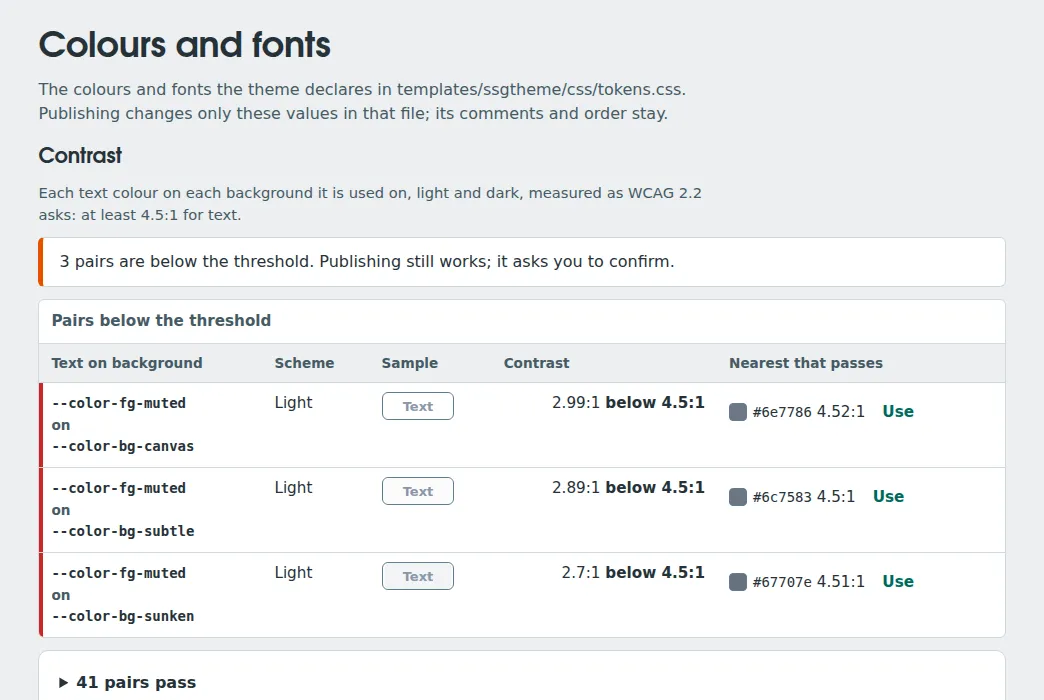
The panel reads the theme's design tokens from its tokens.css (CSS custom
properties; ssgtheme, picostore and apidoc ship one) and shows each colour in
light and dark, and each font list with a sample. Text and background pairs
are checked against WCAG 2.2's 4.5:1 in both schemes. A pair below shows its
ratio and the nearest colour of the same hue that passes, with Use. It
does not block: publishing then asks you to confirm. Publishing changes only
the values in tokens.css; its comments and order stay. That is a theme-file
change, so it needs designer-ui:theme. How the panel recognises colours,
fonts and pairs:
the README's token contract.
Preview before publishing
Under the colours, Preview shows a page of the site as it is published
now with the colours and fonts of the tab applied, before anything is
published: the home page, the latest post (the first entry of the feed the
home page announces) or any path on the site (/blog/my-post/). Choose light
or dark and a phone's width (390 px); the frame reloads a moment after each
edit. Only these token values are previewed: changes to templates and
settings show after the next build. Scripts never run in the preview, so
menus and other parts that need them stand still.
How it works: the worker fetches that public page of its own host the way an
anonymous visitor would (no cookie or token of yours is sent; a redirect to
another host is refused; see the limits below), removes every script, event handler
and javascript: address, adds the tokens as one stylesheet and serves the
result at {base}/api/preview. A token value is applied only when it is a
plain colour or font stack: no url(, no ;, {, }, <, \, @ or
:, and no // (a value such as image-set("//host/x.png") would load from
another host), so such a value is left out of the preview. The answer
comes with its own policy: no script source, sandbox, framed by the panel
only. The panel shows it in an
<iframe sandbox> without allow-scripts or allow-same-origin. The site's
X-Frame-Options: DENY stays as it is. Fonts from a font host (they send
Access-Control-Allow-Origin) appear; fonts the site serves itself appear
only if it sends that header for them, for example in _headers:
1/fonts/*
2  Access-Control-Allow-Origin: *
Otherwise the preview shows a fallback font.
Limits. Each preview costs one request to the site (the latest post two
more: the home page and its feed). Every page and feed it reads is capped by
DESIGNER_PLAN: 256 KiB on Free, 2 MB on Paid, counted as the bytes
arrive — the Free plan's 10 ms of CPU sanitizes about that much dense markup
(a 2 MB page took 75–230 ms, measured in Node). A larger page shows "too large
to preview on this plan" (page_too_large). Each fetch, with its redirects
and its body, has 10 seconds; a site that takes longer shows
upstream_timeout (504). The page is read one piece of markup at a time, so
even 2 MB needs about 20 MB of memory, well inside a Worker's 128 MB.
Pages protected only at Cloudflare's edge: the preview fetches any path of
its own host anonymously and shows the HTML to anyone with
designer-ui:read. If parts of the site are protected only at the edge
(Cloudflare Access, WAF rules by IP or country), check on the deployed zone
whether the Worker's request to its own zone bypasses them; until verified,
do not rely on edge-only protection for pages a designer-ui:read holder
must not see.
Theme files
Theme files shows the folder tree of <templates_dir>/<template>, a text
editor with line numbers and search, image replacement (same type, same
name), and each file's history with a difference view and Restore. Only
these extensions are written: .html .css .scss .js .json .svg .png .webp .woff2. A theme that is not in the repository (built into ssg, such as
simple or krowy, or downloaded through online_theme) cannot be edited
here; the panel says how to bring it in: run ssg once locally with the same
configuration, which writes the theme's files, and commit that folder.
Publishing
Settings and theme changes wait in the panel until Review and publish,
which lists every change in words ("Site name: “Mine” → “Example Kitchen”",
files with lines added and removed) and sends them as one commit. If the
overlay or a file changed on the branch in between, nothing is overwritten:
the panel reads the new version, keeps your edits on top of it and lets you
publish again or drop them. A branch protected by required pull requests or
status checks refuses the commit (409 branch_protected); pull requests are
not supported in this version. History works as in the editor: an old
version is restored by publishing it again.
Scripts and AI assistants
REST routes under /designer/api/ and an MCP endpoint at
POST /designer/mcp give a script or an assistant the panel's operations,
with the same permission checks. Sign-in is the same as for the editor: an
auth service token exchanged for a 10-minute access token
(EDITOR-API). Tools:
designer_list, designer_read, designer_write, designer_config_read,
designer_config_set, designer_publish, revisions_list,
revision_read, help. For example, change two settings in one commit:
1curl -s https://example.com/designer/mcp \
2  -H "authorization: Bearer $ACCESS" -H 'content-type: application/json' \
3  -H 'accept: application/json, text/event-stream' \
4  -d '{"jsonrpc":"2.0","id":1,"method":"tools/call","params":{"name":"designer_config_set","arguments":{"message":"Polish site name","changes":[{"key":"title","value":"Przykładowa kuchnia"},{"key":"mddb.lang","value":"pl"}]}}}'
Arguments, the REST routes and the differences from ssg mcp's
designer_* tools: the README's MCP section.
Limits, local preview and what it protects
- Limits are the editor's, chosen by
DESIGNER_PLAN:free(default) allows 10 files and 2 MiB per publication,paid50 files, 10 MiB per file and 20 MiB in all; any other value answers503 bad_plan(EDITOR-OPERATIONS). - Local demo, no account, no network:
node --import ./workers/designer-ui/test/resolve.mjs workers/designer-ui/test/dev-server.mjs, thenhttp://localhost:8788/designer/with the accountsowner,advanced,settings,themeandreader. - What it protects and what it does not:
the README's section,
written after the security review. Above all: holders of
designer-ui:themeordesigner-ui:advancedcan run code in your CI and put scripts on every page.
Not built yet
- Pull requests and preview deployments; repository hosts other than GitHub.
- Writing
.ssg.yamlitself, workflows or secrets (by design); installing a theme from the panel. - Deleting or moving theme files over MCP (REST
api/theme/publishdoes).