
Post
ssg 1.9.8: The Newsletter Template Learns to Send
Until now the newsletter worker template did half the job. It collected
sign-ups with Turnstile, consent and one-click unsubscribe, and then handed
you a CSV file to send with something else.
1.9.8 adds the sending side as a second, optional worker, newsletter-ui: an
admin panel and a send engine that run in your own Cloudflare account, on the
same database as the sign-up form. You write a campaign in Markdown, preview
it, send yourself a test, pick who gets it and schedule it. The worker sends
it in batches through your own SMTP server, Resend or MailChannels, keeps
bounces and complaints on a suppression list, and counts what happened.
It is for sites with a list of a few hundred to a few tens of thousands of readers that would rather not copy that list into one more account. If the sign-up form is all you want, nothing changes for you, and a test suite checks that.
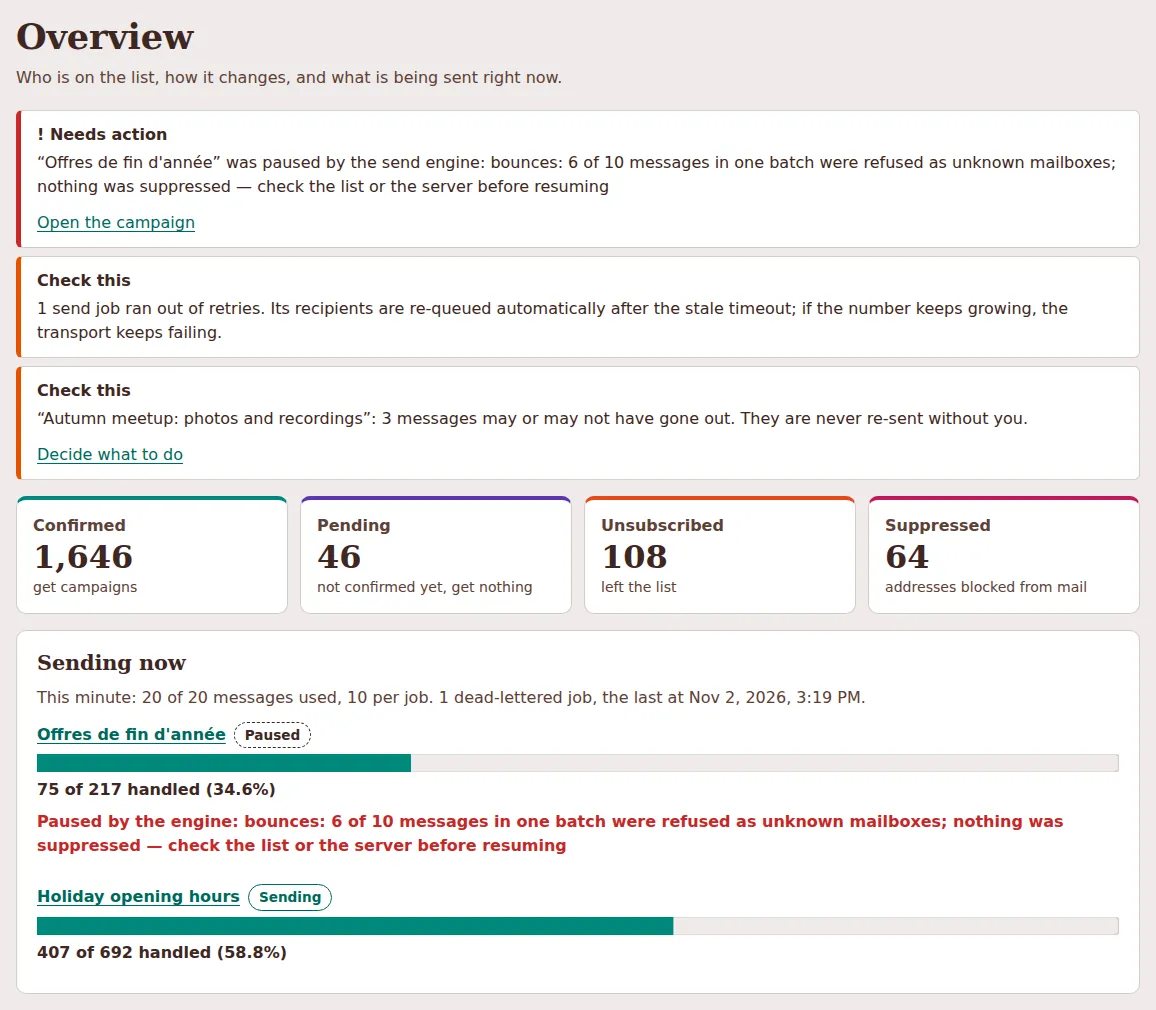
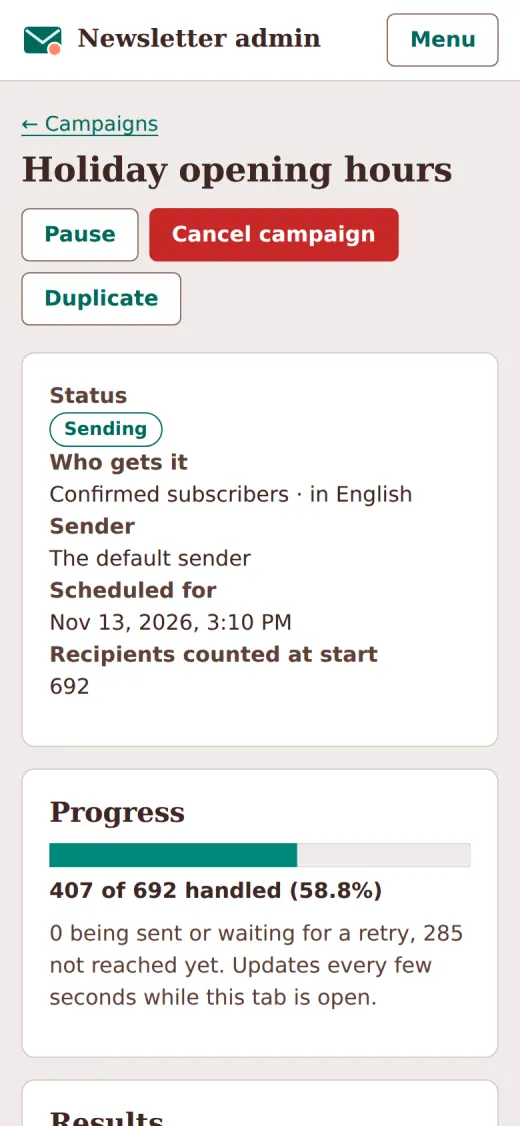
The screenshots come from the local demo described at the end. All data in them is invented, and every address is on an example domain.
Two workers, one database
The template you may already run is a set of Pages Functions, and Pages
Functions only answer requests: no schedule, no queue. A campaign needs both,
to start at 9:00 on Tuesday, go out in batches and carry on after a batch
fails. So newsletter-ui is a standalone Worker with its own wrangler.toml,
a cron trigger every minute, a send queue and a dead-letter queue, deployed
with wrangler deploy from its own directory. It does not belong in the
workers: list of .ssg.yaml, and ssg refuses it there.
The two share the D1 database bound as NEWSLETTER_DB. The subscribers
table stays the template's, at its first schema version: the new worker never
creates, alters or indexes it and adds no status. Its campaigns, send ledger
and suppressions live in tables of its own, so it runs on a database an
existing install already filled, with no migration.
"Nothing changes" is checked, not hoped for. A compatibility suite replays every endpoint of the template against answers recorded from 1.9.7: status, headers, JSON, CSV, the HTML pages byte for byte, the stored rows, and every request to Turnstile and to a mail provider. A second suite runs every route of the new worker, the cron, a whole campaign, an import, a webhook and an erasure against the 1.9.7 table, and checks after each step that its definition is unchanged.
Two template changes are deliberate and tested separately. Its confirmation
mail can now go through SMTP (NEWSLETTER_SMTP_HOST), after Resend and
MailChannels. And SMTP settings that can never send, such as port 25 or a user
without a password, now make sign-ups answer not_configured. In 1.9.7 any
SMTP settings were ignored and sign-ups were confirmed at once, which would
mean confirming addresses without proof of consent. A site with a Resend or
MailChannels key, or with no mail settings, behaves exactly as before.
Sending: your SMTP server or an HTTP provider
Both workers read the same variables. The first transport configured wins, in
a fixed order: NEWSLETTER_RESEND_API_KEY, NEWSLETTER_MAILCHANNELS_API_KEY,
then NEWSLETTER_SMTP_HOST. SMTP runs over a Cloudflare TCP socket on 465
(TLS) or 587 (STARTTLS), TLS required; port 25 is refused with a message,
because Cloudflare blocks it.
What the worker cannot do is vouch for your domain. DKIM is signed by your
mail server, and SPF and DMARC live in your DNS. For a newsletter the DKIM
signature should cover the unsubscribe headers, so check what your server
signs. The headers themselves are added for you: List-Unsubscribe with the
reader's own link, List-Unsubscribe-Post: List-Unsubscribe=One-Click
(RFC 8058, which Gmail and Yahoo require from bulk senders), List-Id and
Precedence: bulk.
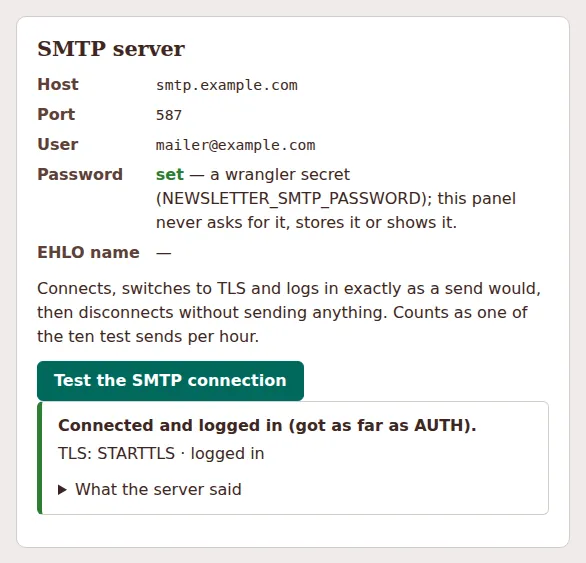
Settings shows the configuration, with secrets only as "set" or "not set", and can test the SMTP connection: connect, TLS and login exactly as a send would, then disconnect without sending.
Writing and sending a campaign
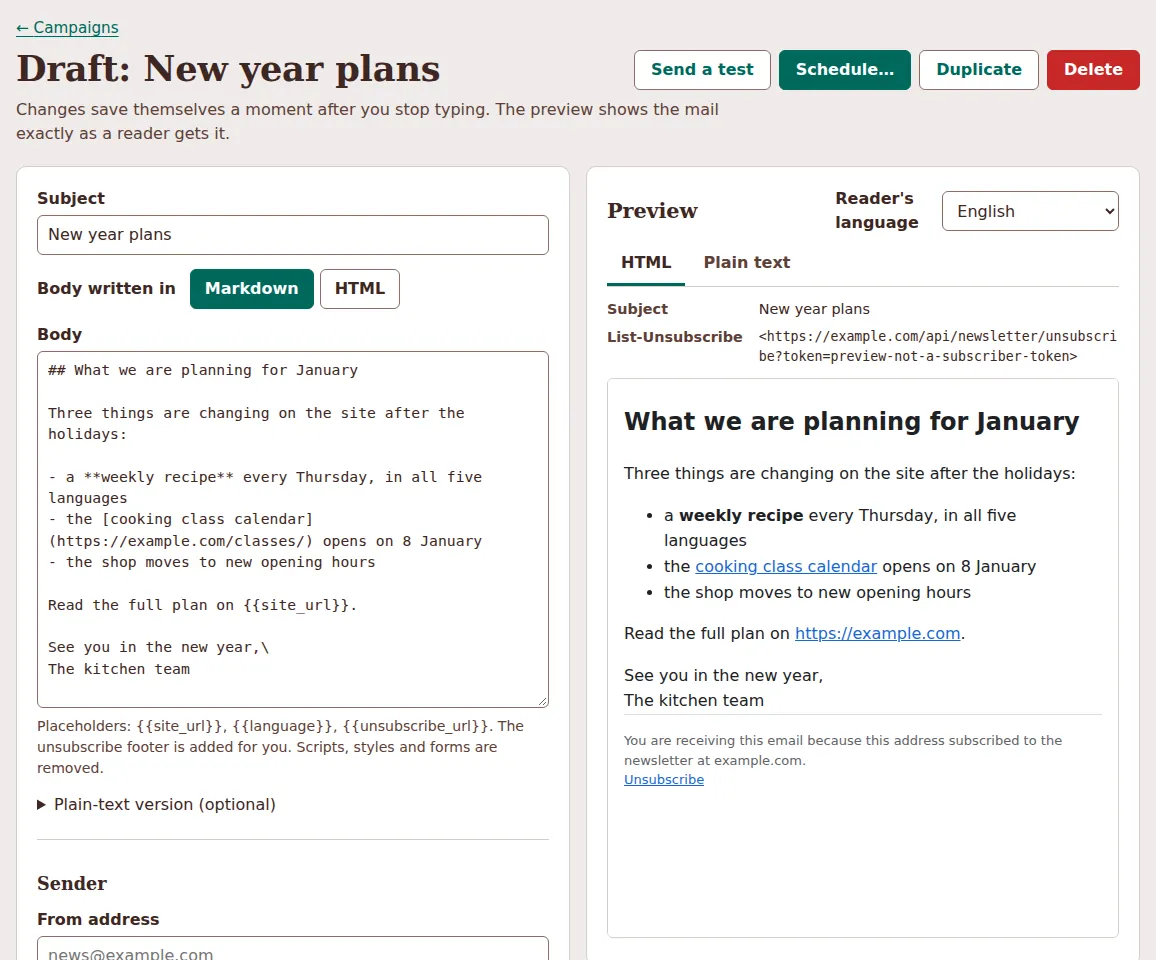
A campaign is a subject, a body in Markdown or HTML, an optional plain-text
version, a sender and a segment. The editor saves as you type. The preview is
drawn by the same renderer that sends the mail, so it shows what a reader
gets: the sanitised body (no scripts, forms or style attributes), the footer
with the unsubscribe link in the reader's language, and the headers. The only
placeholders are , and ``;
anything else in double braces is refused on save, so a typo never becomes an
empty string in someone's inbox.
A test send goes to any address, with [TEST] in the subject, up to ten an
hour. The segment is always confirmed subscribers, narrowed by language
(pt also matches pt-BR) and tags (any or all), with a live recipient
count. Schedule for now or later, pause and resume. A draft can also start
from a post in your feed; nothing is sent when you publish.
When something goes wrong
This is the release's main work. A newsletter must not send anyone the same issue twice, and must not silently drop anyone. The hard cases are a worker that stops halfway.
Claim, then send. Each recipient has one row in a send ledger, unique per campaign and subscriber. The engine claims a row immediately before handing that one message to the transport, one at a time, never a batch ahead, and a repeated queue job skips finished rows. The same statement checks once more that the person is still confirmed and not suppressed, and the campaign still running. So an unsubscribe takes effect before the next message, even in the middle of a campaign.
A crash leaves at most one message in doubt, and it is never re-sent automatically. If a worker dies between the provider's "accepted" and our "sent", nobody knows whether that message left. With one claim at a time, at most one message per running consumer can end up there. After a timeout (30 minutes by default) it becomes uncertain: not retried, not counted as sent or failed, and not holding the campaign open. A possible duplicate is worse than one visibly missing message, so you decide: re-send once through the normal path, or dismiss.
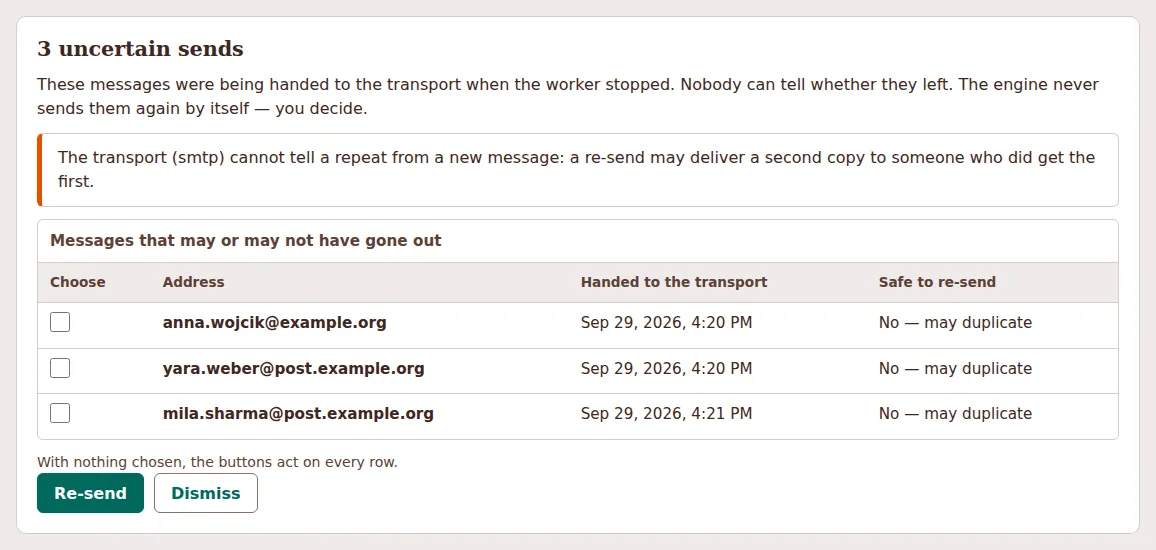
Idempotency keys only where the provider honours them. Each message
carries the key {campaignId}:{subscriberId}. Resend takes it as an
Idempotency-Key and documents sending at most once per key within 24 hours,
so a re-send within that window is marked safe. MailChannels documents no such
mechanism, so nothing is sent there. Over SMTP the key becomes a fixed
Message-ID, which some receivers de-duplicate on and many do not. For those
two the panel says a re-send may deliver a second copy.
A hard-bounce circuit breaker. When a batch is suddenly refused as "unknown mailbox", the fault is usually your server or your list, not the readers. If at least 5 hard bounces make up at least half of a batch's messages so far (both configurable), the engine pauses the campaign and suppresses nobody from that batch. That is the paused campaign at the top of the Overview screenshot.
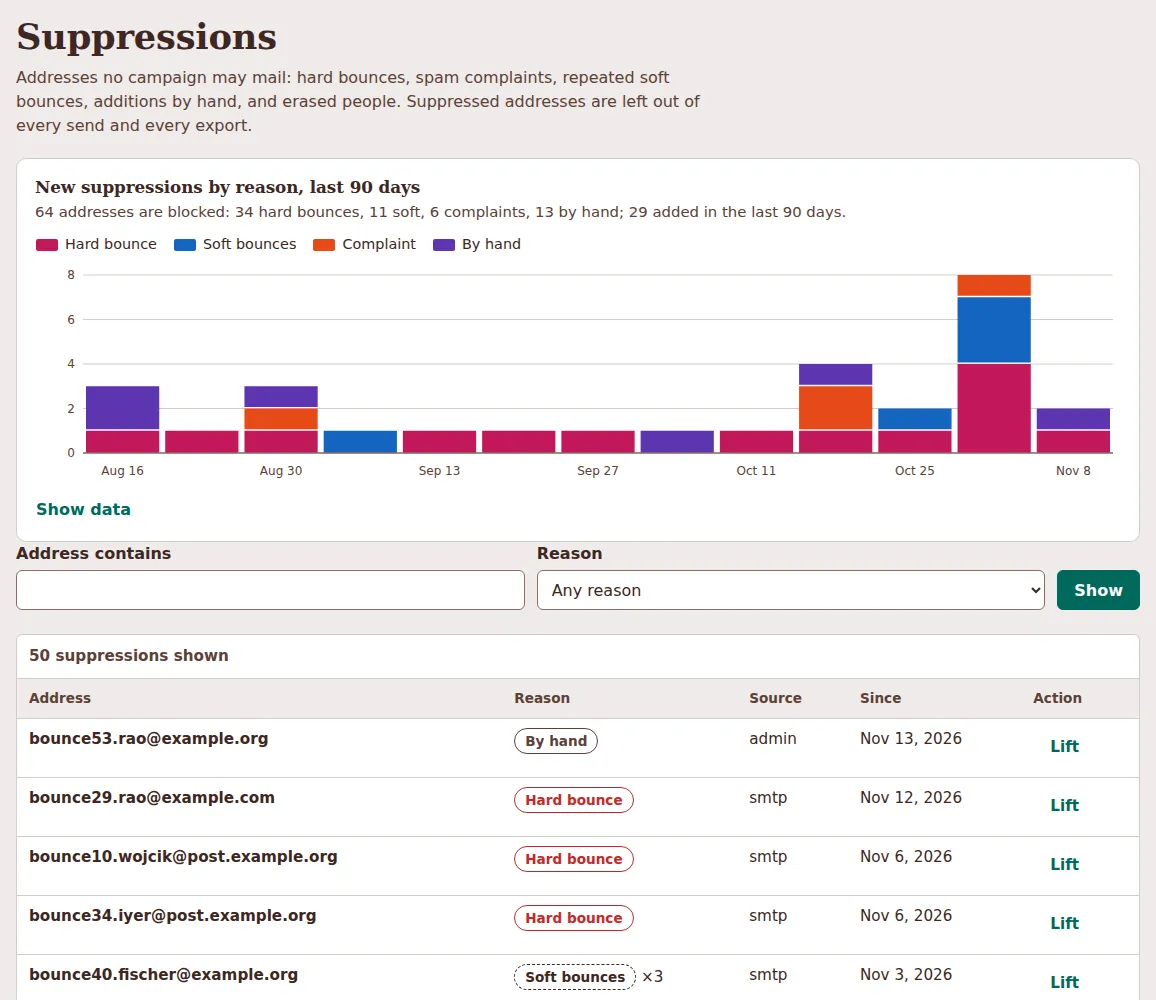
Bounces and complaints go on a suppression list, which every batch excludes and every message re-checks. It fills from SMTP replies while sending (only a clear "no such mailbox" counts; policy and spam refusals are about the sender and count as nothing), from signed Resend and MailChannels webhooks, and from a CSV import for SMTP users, whose bounces arrive as mail. A complaint also unsubscribes the person; a full mailbox suppresses only after three in a row. Lifting a complaint asks for an explicit yes.
Bringing your list with you
The import takes the CSV your current tool exports, as it is. It detects the
delimiter, UTF-8 or UTF-16, a header row or none, and the columns by their
usual names: address, status, sign-up and unsubscribe dates, bounce dates,
language, tags or groups, sign-up page. The preview shows what it found and
lets you correct it before anything is written. When slash dates such as
03/04/2024 never reveal whether the day or the month comes first, it asks
instead of guessing.
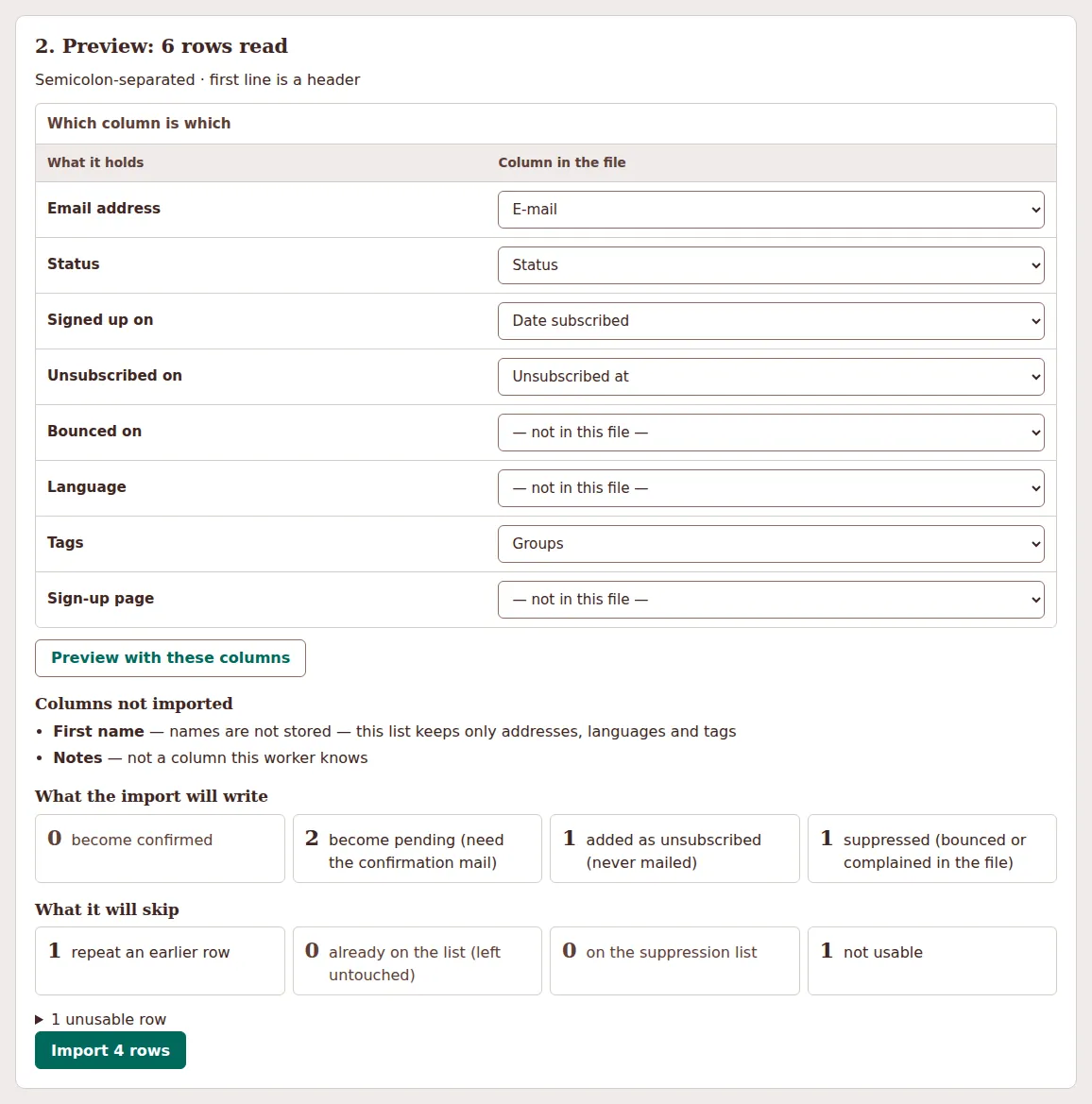
- Unsubscribed stays unsubscribed. An import never undoes an unsubscribe or changes an existing row. People who left are added as unsubscribed, so an older copy of the list cannot bring them back later.
- Bounced and complained go to suppressions, not to subscribers.
- Consent is stated. You say where these people agreed to mail. Active rows become pending unless you confirm they already did double opt-in, and an import sends nothing: you send the confirmation mail from Subscribers.
- Names are not stored. Name columns are recognised and reported as ignored. The mail does not use them, and data you do not keep cannot leak.
Statistics without tracking anyone
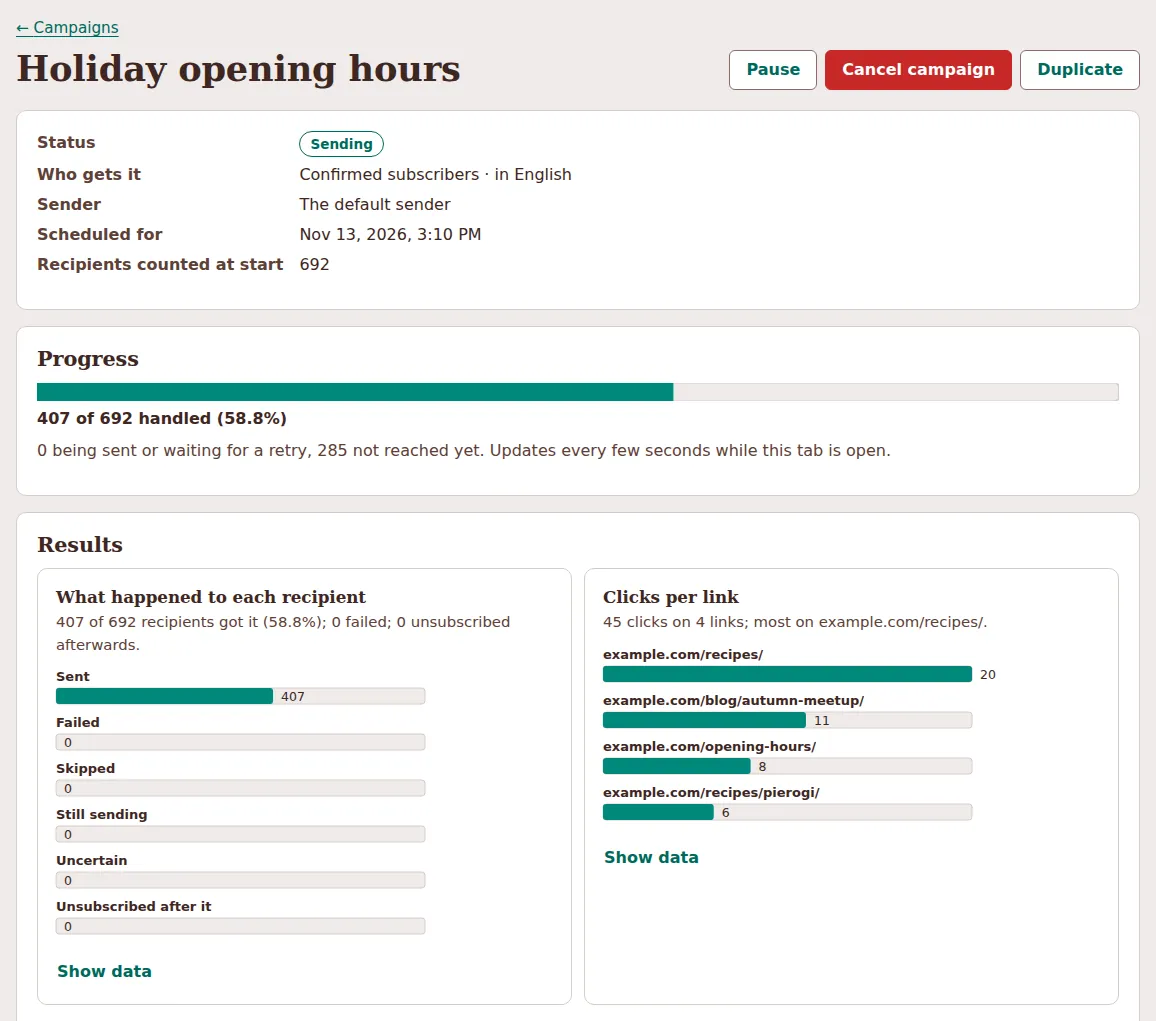
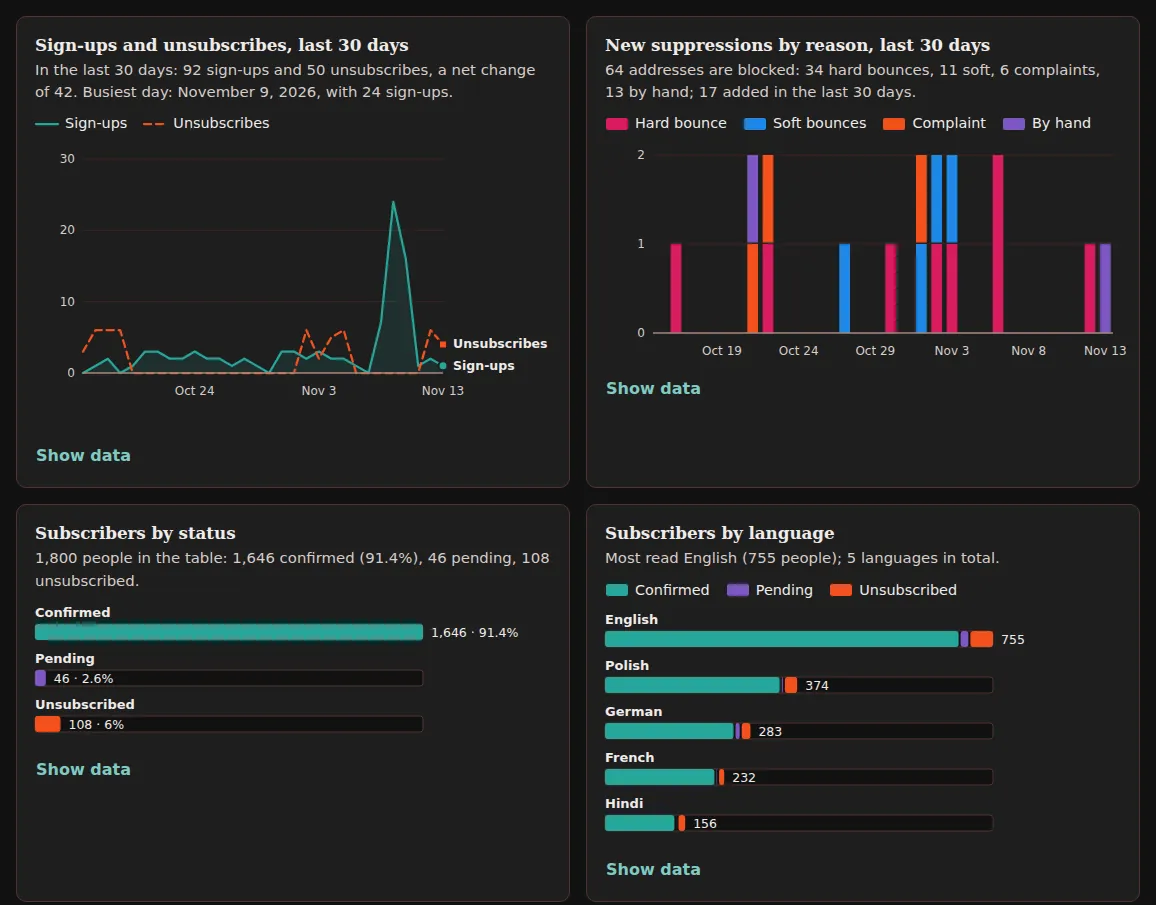
Every number is a count, and no table links an open or a click to a person. Per campaign you get sent, failed, skipped, still sending and uncertain, plus timing; overall, sign-ups and unsubscribes per day and suppressions by reason.
- No opens. There is no tracking pixel. Privacy proxies fetch images on delivery, which makes open rates noise, and a pixel works only by giving each reader a personal image address.
- Clicks are off by default. With
NEWSLETTER_TRACK_CLICKS=truelinks go through the worker, which counts per link, never per person, and stores nothing about the request. Scanners click too: compare links and campaigns, do not read the totals as readers. - Unsubscribes are an approximation. The link carries no campaign, so an unsubscribe is credited to the last campaign sent to that person within the previous 14 days (configurable).
- Bounces and complaints are not credited to campaigns. They arrive later without a campaign id, and the worker does not guess.
The panel
Plain HTML, CSS and JavaScript served by the worker: no framework, no build step, nothing from another origin, a strict Content Security Policy. It sits behind Cloudflare Access or a password with a per-IP lockout. Every chart has a summary sentence and Show data with the same numbers as a table; series differ by more than colour. It speaks English, Polish, Hindi, German and French, follows the system's light or dark theme, and aims at WCAG 2.2 AA, with every colour pair's contrast checked by a test.
It works on a phone down to 320 pixels wide: tables become cards and the sidebar becomes a bar with a menu.
What it costs and how fast it is
By default the worker sends 60 messages a minute in queue jobs of 10, a pace every provider tier and most SMTP servers accept. For a list of 50,000:
| Setup | Time | What limits it |
|---|---|---|
| Defaults (60 a minute, batches of 10), Workers Paid | about 14 hours | the send rate |
| Workers Paid, 480 a minute, batches of 80 | about 1 hour 45 minutes | your provider must accept 8 a second |
| Workers Free, defaults | about 4 days | the free daily D1 write quota, about 13,000 recipients a day |
On the free plan a campaign that uses up the day's quota stalls and resumes from the ledger the next day, without mailing anyone twice; beyond about 10,000 readers, plan on Workers Paid. These figures rest on Cloudflare's published quotas at the time of writing, so check the current Workers, D1 and Queues pricing. The mail itself costs what your provider charges.
What it does not do
- One list, segmented by language and tags. No separate lists, no automations or sequences such as a welcome series.
- No reading of a bounce mailbox: with SMTP, late bounces are imported as CSV.
- No open rates, and no bounce or complaint counts per campaign.
- The MailChannels webhook is checked against its published documentation, not against a live delivery.
- Whether Pages Functions can open the SMTP socket the sign-up template's confirmation mail needs could not be verified live. If they cannot, the template logs it once and sign-ups stay pending.
Try it
The demo runs the real worker on an in-memory SQLite database with about 1,800 invented subscribers, campaigns in every state and a pretend SMTP server. From a checkout of the repository, with Node.js and no npm packages:
1node --import ./workers/newsletter-ui/test/resolve.mjs workers/newsletter-ui/test/dev-server.mjs
2# → http://localhost:8787/newsletter-admin/  (any user name, password "demo")
For a real site, scaffold both templates:
1ssg new worker newsletter
2ssg new worker newsletter-ui
The first is the sign-up form, wired into .ssg.yaml as before. The second
prints its deploy steps: two queues, the admin password or Cloudflare Access,
the same D1 database in its wrangler.toml, then npx wrangler deploy. The
workers guide covers both, the
newsletter-ui README
documents every endpoint, variable and table, and the
changelog has the rest
of 1.9.8.